
GO Launcher S – 3D Theme, Wall
go live llcPersonalization
4.62.61K Reviews
- Version
- 1.21
- Installs
- 5.00M
- Age Rating
- Everyone
Screenshots
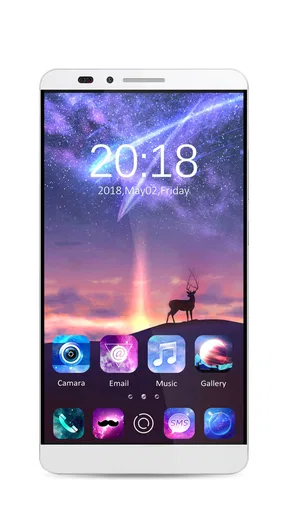
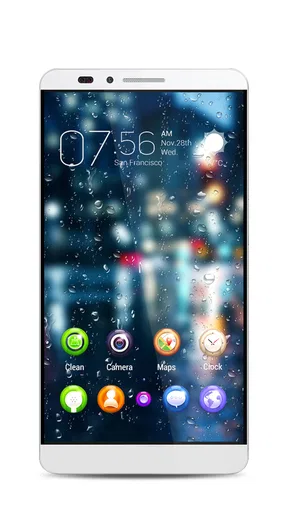
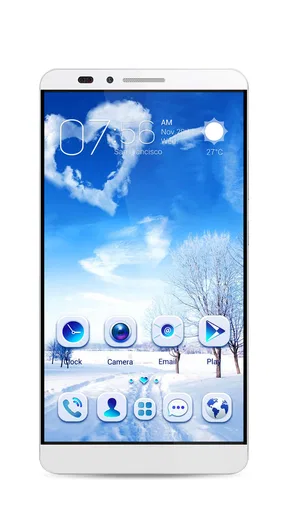
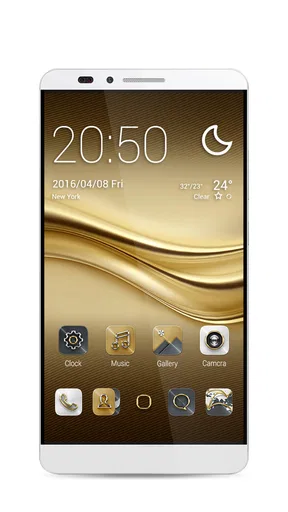
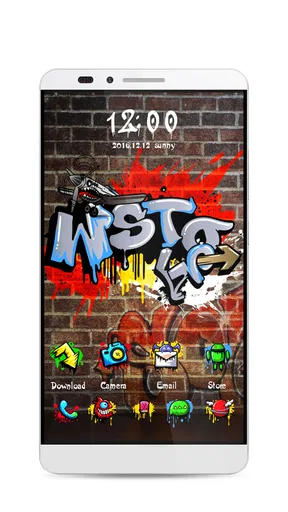
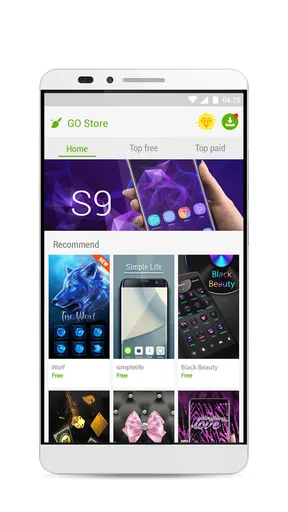
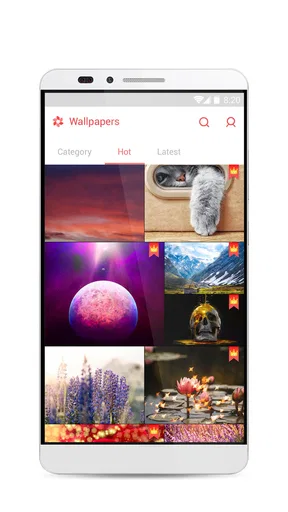
Our Review of GO Launcher S – 3D Theme, Wall
 Analysis by Appyee
I judge a launcher by more than how good its themes look in a preview. It has to make everyday actions—finding an app, checking a widget, moving between screens—feel comfortable enough that I’ll keep using it after the novelty wears off. GO Launcher S – 3D Theme, Wall is aimed at people who want their Android home screen to feel more personal, with visual changes and a collection of customization tools in one place. Its appeal is clear, though a feature-rich launcher is not automatically the right choice for every phone or every routine.
What to decide before changing your home screen
Before installing a launcher, I’d ask myself whether I want a different look, a different way to organize apps, or both. If all I need is a new background, changing the wallpaper through Android’s built-in settings is simpler and avoids replacing the home-screen experience. If I want the icons, screen transitions, and widgets to feel coordinated, a launcher such as this one makes more sense.
GO Launcher S is a free personalization app from go live llc. It has a 4.6 average from around 164,000 ratings, and it has passed 5 million installs. Those figures suggest a well-established audience, but I’d still treat them as context rather than proof that its style or controls will suit me. It is rated for Everyone, and the current version is 1.21.
The practical question is how much change I want to manage. A launcher can affect the first screen I see, the way I reach apps, and the visual rhythm of swiping between pages. That is useful if I enjoy tuning a setup, but it also means there may be more to adjust than with a wallpaper-only app. I’d try it when I have a few minutes to explore rather than during a rushed morning.
Where the customization pays off
As soon as you fire up GO Launcher S, you're greeted with a sleek interface that's surprisingly easy to navigate. The app is designed to cater to those who crave customization without the techy hassle. I felt like a kid in a candy store with all the options laid out before me.
The app's library boasts a staggering variety of themes and wallpapers, both static and dynamic. It's like having a closet full of outfits for your phone. Whether you're into minimalist designs or you prefer a more vibrant, eye-popping aesthetic, there's something here for everyone.
Customization Galore
One of the standout features is the 3D transition effects. It adds a layer of depth and movement that genuinely makes your home screen feel alive. Swiping between screens feels smoother than ever, and the effects are subtle enough not to be distracting.
My advice is to treat effects as part of the overall setup, not as a reason to turn every option on. A restrained transition can give screen changes a bit of character; a busier one may become tiring when I’m opening apps repeatedly throughout the day. I’d try a theme with my usual number of home-screen pages and see whether the movement still feels pleasant after ordinary use, rather than judging it during a quick browse.
Themes are most useful when they help create a coherent screen, not just when they look striking in isolation. I’d pick a wallpaper first, then check whether the icons and widgets remain easy to distinguish against it. A bold background can look great but make small labels harder to scan; a calmer image may work better if I rely on the home screen to find work or travel apps quickly. That small check can save me from building a pretty layout I later abandon.
Let's talk about widgets. The app offers a range of them, from weather to news, and each can be tailored to fit your theme. I loved how I could resize and re-color them to match my setup. It's the little things, right?
Making it useful between makeovers
Widgets can turn a themed screen into a practical one, but I’d keep the first page focused. For example, I might put the information I check most often where it is visible and move rarely used shortcuts to another page. That way, the decorative choices don’t make the phone slower to navigate in the human sense: I’m not searching through a busy layout just to reach a familiar app.
A realistic use for the app is a seasonal reset. If I’m tired of my current screen but don’t want to reorganize every app from scratch, I can use a new theme and wallpaper to change the mood while keeping my familiar app habits. For a more functional reset, I’d first note which apps I actually open from the home screen, then make sure the new layout keeps those easy to reach. The goal is a screen that feels fresh on Monday and still works on Friday.
The launcher may also suit someone who shares a device now and then or prefers a less exposed home screen. App Lock can lock specific apps with a pattern or passcode, while Hide Apps can conceal apps from the home screen. I’d think of these as extra organization and privacy conveniences, not a replacement for a device’s broader security settings. Before relying on a lock for anything important, I’d check how it behaves on my own phone and make sure I can still reach the apps I need.
Everyday comfort, ads, and performance
Now, I won't sugarcoat it; the app does come with ads. They pop up occasionally, which can be a bit annoying, especially if you're in the middle of tweaking your setup. However, there's an option to go ad-free with a premium upgrade. If you really dig the app, it might be worth considering.
There are in-app purchases ranging from $0.99 to $94.99 per item, so I would browse carefully rather than assume every theme or upgrade is included for free. The app itself costs nothing to try, which makes it easier to see whether its approach suits me before spending. I’d only pay after using the launcher long enough to know that I want to keep it; a quick burst of theme browsing is not a good reason to buy something I may stop using.
Performance-wise, the app runs smoothly on most devices. Even on my older phone, I didn't notice any significant lag or crashes. It's optimized well, which is always a plus in my book.
Still, performance is something I’d judge on my own device, especially if it is older or already feels sluggish. A launcher changes the layer I interact with all day, so even a small delay in opening the home screen can matter more than a visual effect. I’d test the basic routine—unlock, swipe, open a frequently used app—before spending time polishing every page. If the everyday feel is not right, the prettiest theme will not fix that.
When another kind of option fits better
Compared with a wallpaper app, GO Launcher S offers a broader makeover: the experience includes themes, widgets, and screen transitions rather than only changing the background. The trade-off is that a larger set of controls can take more attention to set up. If I want one image and no change to how my phone behaves, the built-in wallpaper picker or a simple wallpaper tool is the more sensible choice.
Compared with a minimalist launcher, this app leans toward visual variety and hands-on personalization. Someone who wants a plain, predictable home screen with as few choices as possible may find that emphasis unnecessary. On the other hand, people who enjoy matching icons, widgets, and backgrounds have more reason to explore it. I wouldn’t choose by feature count alone; I’d choose according to whether I want to spend time shaping the interface or simply get out of its way.
There is also a switching cost worth considering. A new launcher can make familiar gestures and screen arrangements feel different, so I’d avoid changing everything at once. I would try a basic layout first, keep the most-used apps easy to find, and only then experiment with effects and extra widgets. If I later return to my previous home screen, that gradual approach makes it easier to tell whether the issue was the launcher itself or an overcomplicated setup.
User Experience
Now, I won't sugarcoat it; the app does come with ads. They pop up occasionally, which can be a bit annoying, especially if you're in the middle of tweaking your setup. However, there's an option to go ad-free with a premium upgrade. If you really dig the app, it might be worth considering.
Performance-wise, the app runs smoothly on most devices. Even on my older phone, I didn't notice any significant lag or crashes. It's optimized well, which is always a plus in my book.
Additional Perks
Beyond the aesthetics, GO Launcher S offers a nifty feature called App Lock. This adds an extra layer of security by letting you lock specific apps with a pattern or passcode. It's a nice touch if you're sharing your device or just want to keep prying eyes away.
There's also a Hide Apps feature, which allows you to conceal apps you don't want cluttering up your home screen. It's like Marie Kondo for your phone—only keep what sparks joy!
A sensible way to try it
For a first session, I’d make one change at a time: select a theme, use the phone normally, and then decide whether widgets or transitions improve the experience. This makes it easier to spot what I actually like instead of confusing a dramatic visual makeover with a better daily setup. If I keep the launcher, I can refine the layout later; if I don’t, I haven’t invested much time in customizing details I will lose.
I’d also check that the text and icons remain readable in the places I use most, and that any hidden apps are still easy for me to access when needed. These are small checks, but they matter more than a theme preview when I’m trying to use the phone quickly. The best result is not necessarily the most decorated screen; it is one that feels personal without getting in the way.
Final Thoughts
So, is GO Launcher S – 3D Theme, Wall worth your time? If you're someone who loves to personalize and breathe new life into your device, this app is definitely worth a try. The customization options are vast, and the interface is user-friendly.
Sure, the ads can be a little intrusive, but they're not a deal-breaker, and the premium version is always an option. With its smooth performance and creative themes, GO Launcher S offers a fun and engaging way to make your phone truly yours.
I’d recommend it most to Android users who enjoy changing their home screen and are willing to spend a little time balancing appearance with convenience. It is less compelling for anyone who only wants a new background, dislikes ads while adjusting settings, or prefers a nearly invisible launcher. If you’re unsure, the free download gives you a low-commitment way to test whether its visual style and daily controls suit you; the minimum operating-system requirement is Android 7.0.
If you're ready to give your home screen a makeover, you can download the app from the links below. Happy customizing!
Verdict
Strengths of GO Launcher S – 3D Theme, Wall
- Customizable themes enhance personalization.
- Smooth user interface for easy navigation.
- Frequent updates with new features.
- Low battery consumption compared to others.
- Offers a wide variety of widgets.
Limitations of GO Launcher S – 3D Theme, Wall
- Contains ads that can be intrusive.
- Some features require in-app purchases.
- Occasional lag on older devices.
- Limited support for certain icon packs.
- May require additional permissions.
Other Releases by go live llc
View All
GO Launcher -Themes&Wallpapers
Personalization4.3
Similar Picks in This Category
View All
Microsoft SwiftKey AI Keyboard
SwiftKey4.3

Wallpapers
Google LLC4.1

Zedge™ Wallpapers & Ringtones
Zedge4.7

Yandex Browser with Alice AI
Direct Cursus Computer Systems Trading LLC4.3

Ringtone Maker:create ringtone
Big Bang Inc.4.7

Fonts Keyboard
Fonts Keyboard3.9
Frequently Asked Questions
What is GO Launcher S – 3D Theme, Wall and what features does it offer?
GO Launcher S – 3D Theme, Wall is a customization app that transforms your Android device's interface with 3D themes, wallpapers, and widgets. It offers a sleek and intuitive UI, multiple transition effects, a variety of widgets, and the ability to organize apps efficiently. Users can personalize their devices to reflect their style and preferences.
Is GO Launcher S – 3D Theme, Wall free to use?
Yes, GO Launcher S – 3D Theme, Wall is free to download and use. However, it offers in-app purchases for premium themes and additional features. These purchases are optional and allow users to access a broader range of customization options, including exclusive themes and ad-free experiences.
How does GO Launcher S – 3D Theme, Wall affect device performance?
While GO Launcher S – 3D Theme, Wall is designed to be lightweight and efficient, it may consume more resources than a standard launcher due to its advanced graphics and animations. Users with older or less powerful devices might experience slight performance lags. It's recommended to monitor device performance after installation.
Can I revert back to my original launcher after using GO Launcher S – 3D Theme, Wall?
Yes, you can easily switch back to your original launcher or any other launcher on your device. To do so, go to your device's settings, navigate to 'Apps,' and select your previous launcher as the default. This process is straightforward and does not require uninstalling GO Launcher S.
Are there any privacy concerns with using GO Launcher S – 3D Theme, Wall?
GO Launcher S – 3D Theme, Wall requires certain permissions to function effectively, such as access to storage and system settings. While these permissions are standard for most launchers, users should review the app's privacy policy to understand how their data is used. It's important to download from reputable sources to ensure security.
